


Hyundai Bluelink Explained: What It Does and How to Set It Up
You lock your car from a grocery store aisle, warm up the cabin before a January commute, and get a text if a teen driver stays out past curfew. That is Hyundai Bluelink at work, the connected car service built into most Hyundai models and run through the MyHyundai app. Plenty of owners have Bluelink and never use half of it. This guide from Watson Family Hyundai covers what each package does, how the free trials work, and how to get your car enrolled in a few minutes.
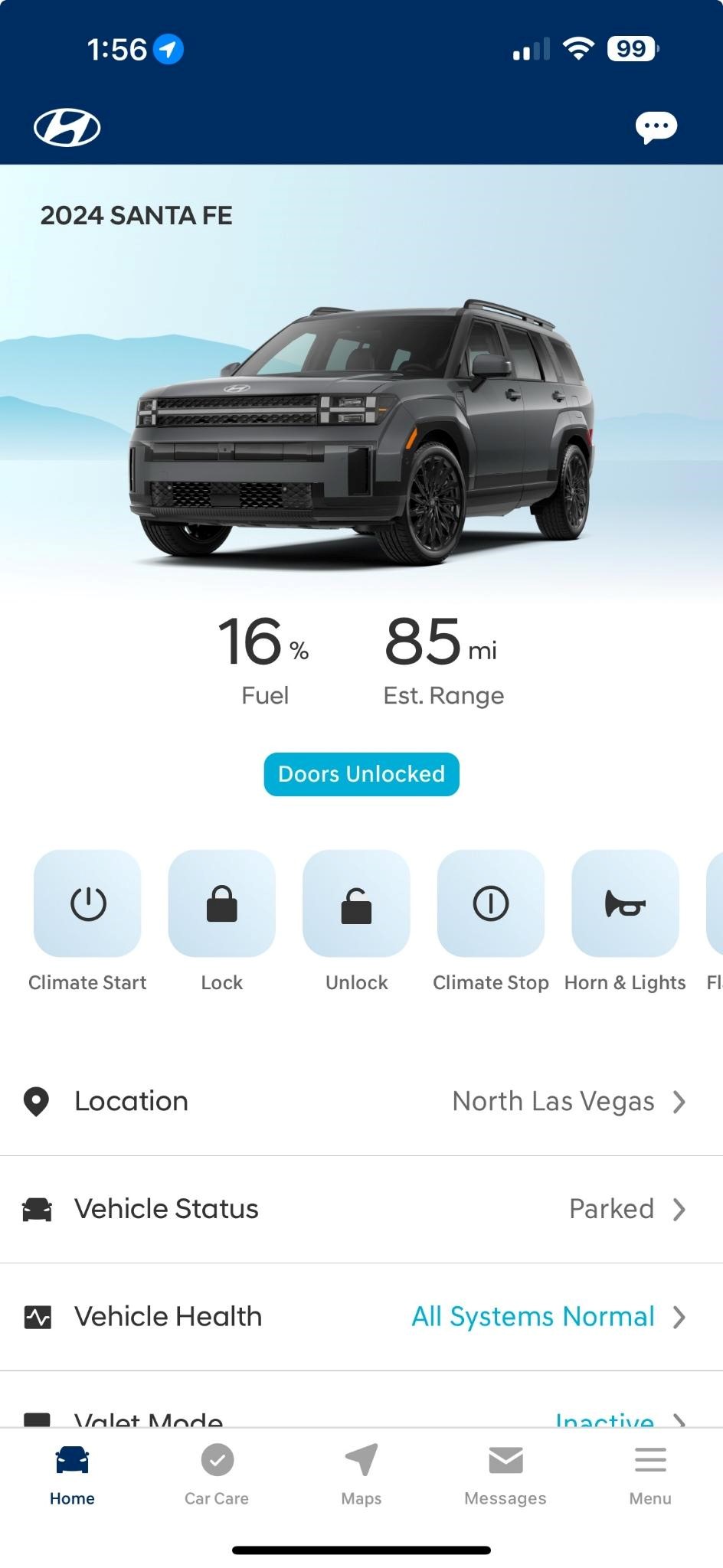
What Hyundai Bluelink Actually Does
Bluelink is Hyundai’s connected car service. It uses the vehicle’s built-in cellular connection and GPS, so most features work even when your phone isn’t in the car. Remote features are the exception, since you send those commands from the MyHyundai app on your phone, smartwatch, or smart speaker.
Bluelink is organized into three packages:
- Connected Care covers safety and car care, backed by a call center staffed 24/7 for help and emergency assistance.
- Remote lets you start the car, set the climate, lock or unlock the doors, and find your parked car from the app or the web.
- Guidance adds route guidance and Destination Search on vehicles with factory navigation.
Bluelink first appeared on the Sonata and is now available on most Hyundai models, though a few older models were built without it. If you’re shopping used, confirm the car is Bluelink-equipped before you count on remote start. Because the system depends on cellular and GPS coverage, features may not respond in places with no signal. For a quick overview of what your model supports, see our Bluelink connected services page.
The Bluelink Features You’ll Use Most
Remote start and climate control
Remote Start with Climate Control starts the engine and warms or cools the cabin before you get in. It requires the Remote package and a push-button start Hyundai with an automatic or dual-clutch transmission. On a February morning in Tinley Park, that means less time scraping and shivering.
Lock, unlock, and find your car
Remote Door Lock and Unlock works through a PIN on your phone, smartwatch, or connected home device. Remote Car Finder shows where you parked, which helps after a concert or in a packed mall lot. Destination Search lets you send addresses from the app, or by voice, to the car’s navigation and save several destinations for later.
Safety and security
- Automatic Emergency Assistance calls for help when the airbags deploy, and the SOS button connects you to 24/7 assistance.
- Enhanced Roadside Assistance sends your GPS location to a Bluelink agent and works alongside Hyundai’s 24/7 Roadside Assistance.
- Geofence, Curfew, and Speed Alerts send preset notifications, which many parents use for new drivers.
- Panic Notification sends a text or email to you, family, or friends when the panic button is pressed.
- Stolen Vehicle Recovery helps police locate the car once you have a police report number.
Diagnostics and service
On-Demand Diagnostics runs a full vehicle check from the touchscreen, which gives you more to go on when a warning light comes on far from home. Service Link lets you request service from the driver’s seat and send it to your preferred dealer, or you can book a service appointment online whenever the car flags something.
Bluelink Trials and Plans in Plain Terms
How long Bluelink is free depends on how you buy the car:
- New Bluelink-equipped Hyundais include a complimentary three-year trial of Connected Care, Remote, and Guidance. Guidance only applies if the car has factory navigation.
- Pre-owned and Certified Pre-Owned Hyundais include a three-month trial. A credit card is required to start it.
- After a trial ends, each package is a separate paid subscription, billed monthly or yearly. Features aren’t sold one at a time.
- Bluelink+ is a separate no-charge plan for the original owner on many newer models. Map and multimedia over-the-air updates carry fees after an initial three-year period, and current Bluelink subscribers can’t switch to it.
If you’re weighing a new Hyundai against a Hyundai Certified Pre-Owned vehicle, the difference between a three-year and a three-month trial is worth a line on your comparison list.
How to Set Up Bluelink in a Few Minutes
Enrollment takes less time than reading this article. Here is the process:
- Download the MyHyundai app, or go to owners.hyundaiusa.com, and create or sign in to your MyHyundai account.
- Have your VIN handy. You’ll find it on the driver’s side of the dashboard.
- Follow the on-screen steps to enroll. The new-vehicle trial doesn’t require a credit card, but auto-renewal does, and adding extra years during enrollment qualifies for discounted rates.
- Set your PIN for remote commands, then connect a smartwatch or Amazon Alexa if you use one.
If you buy a pre-owned Hyundai, start the three-month trial right away so you can learn which packages you’d actually pay to keep. The app runs on iPhone and Android phones, Apple Watch and Wear OS watches, and Amazon Alexa. If you’d like to see Bluelink before you buy, schedule a test drive and ask to walk through the screens in the car.
Frequently Asked Questions
Is Hyundai Bluelink free?
New Bluelink-equipped Hyundais include a three-year trial of the Connected Care, Remote, and Guidance packages, and pre-owned Hyundais include a three-month trial. After that, each package is a paid subscription. Many newer models also offer Bluelink+, a no-charge plan for the original owner.
Does Bluelink work without my phone?
Yes. Most features run through the car’s embedded system as long as there is cellular and GPS coverage. Remote features, such as remote start and door lock, need the MyHyundai app.
Can I remote start my Hyundai with Bluelink?
You can if you have the Remote package and a push-button start Hyundai with an automatic or dual-clutch transmission. Remote Start with Climate Control also warms or cools the cabin before you get in.
Can Bluelink help find a stolen car?
Stolen Vehicle Recovery helps law enforcement locate the vehicle. File a police report first, because a report number is required before the service can help.
Can Watson Family Hyundai help me set up Bluelink?
Yes. Stop by 8101 W 159th St in Tinley Park or call our sales team at 708-726-4119, and we’ll help you create your account and enroll, including the trial on pre-owned and Certified Pre-Owned Hyundais.
Hyundai Bluelink turns your phone into a remote for your car, adds a 24/7 safety net, and keeps maintenance on track with diagnostics and Service Link. The trick is knowing which package covers what and enrolling early so your trial doesn’t go unused. Whether you drive in from Orland Park or Matteson, we’re glad to show you how it works. Browse new Hyundai models with Bluelink and pick the one that fits your routine.

0 comment(s) so far on Hyundai Bluelink Explained: What It Does and How to Set It Up